
This post may contain affiliate links, If you choose to buy through these links, I may receive a small commission at no additional cost to you.
Ever stood up from your desk after a massive afternoon staring at your laptop and felt like the entire room just tilted sideways?
You aren’t going crazy, and it isn’t just regular fatigue either. You are probably dealing with virtual motion sickness.
It hits out of nowhere. One second you are doing fine, and the next, you have this annoying dull ache right behind your eyes, a weird wave of mild nausea, or a split second of dizziness when scrolling down a huge spreadsheet too fast. With remote work dominating everyone’s routine now, thousands of desk workers are quietly dealing with this exact digital hangover. The medical world calls it cyber-sickness. But honestly? It just feels like getting seasick while sitting completely still in your own room.
The good news is you don’t have to quit your online career or buy stupidly expensive health gadgets. Most of the time, the real issue isn’t even the screen itself it is just the way your physical desk layout forces your eyes and brain to interact. By fixing a few small things around your workspace, you can stop the dizziness and get your focus back. If you want to Fix Screen Motion Sickness, simple physical changes are always your best first step.
Why Do I Get Dizzy Looking at Screens?
To actually fix this, you have to understand the weird mix-up happening inside your head. It is a classic sensory disagreement.
Your eyes are watching fast movement on the screen like rapid scrolling, quick Slack pop-ups, or sudden video cuts. Because of that, your brain assumes you are physically moving through space. But at the exact same time, the fluid inside your inner ear (which handles your balance) tells your brain that you are sitting dead still in an office chair.
According to health experts, this classic sensory mismatch makes your nervous system freak out a bit, triggering symptoms that feel just like car sickness.
[Eyes See: Rapid Page Scrolling] ─────┐
                                      ├─► [Brain Confusion] ─► Nausea & Fatigue
[Inner Ear Feels: Completely Still] ──┘
This massive conflict makes your nervous system freak out a bit, triggering symptoms that feel just like car sickness. It completely saps your battery long before your workday even hits the halfway mark. Learning how to Fix Screen Motion Sickness relies entirely on eliminating this exact sensory conflict.
If your workspace layout is incorrect, it doesn’t just hurt your eyes; it drains your entire body’s energy. In fact, if you want to know why modern homes feel tiring and how to fix it without spending a single rupee, balancing your room’s sensory levels is the ultimate secret.
5 Home Ergonomic Desk Hacks to Stop Digital Motion Sickness
Fixing your home workspace doesn’t require spending a ton of money. These practical adjustments are all about making your physical environment play nice with your screens so you can Fix Screen Motion Sickness without buying fancy gear.
1. The 20-20-20-20 Rule (Resetting Your Eyes)
You probably know the basic 20-20-20 rule by now: every 20 minutes, look at something 20 feet away for 20 seconds. But to beat screen sickness specifically, you have to add a fourth step: blink 20 times on purpose.
When staring intensely at text or code, we stop blinking naturally. Our blink rate drops by almost half. This dries out the eyes completely, blurs your vision, and forces your brain to strain twice as hard to read. That extra strain makes dizziness kick in way faster.
Stick a physical note on your monitor or use a basic phone timer.
Look completely away from the desk toward a window or a far corner.
Blink slowly and deliberately to get the moisture levels back to normal.

2. Get Your Monitor Level With the True Horizon
If your screen sits too low or too high, your neck muscles have to work overtime to hold your head up. That constant tightness restricts blood flow and makes digital headaches way worse. Getting your screen height dialed in is one of the easiest ways to Fix Screen Motion Sickness before the workday ends.
The top third of your screen needs to line up with your exact eye level. When looking straight ahead, you should see the top URL bar of your browser naturally.
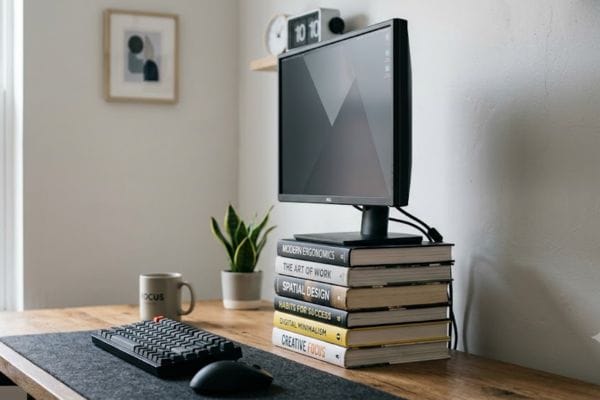
The DIY Lift: Grab a few heavy hardcover books or an old wooden crate and stack them right under your laptop or monitor stand. However, if you want a cleaner, professional setup that adjusts in seconds, investing in a heavy-duty option like the HUANUO FlowLift Dual Monitor Stand lets you dial in the exact eye level required to completely protect your vision.
The Angle: Tilt the screen back slightly (around 10 to 20 degrees). This mimics the natural angle you hold a book when reading, cutting down on the harsh ceiling light reflections that make your eyes twitch.
3. Balance Out Your Side-Vision Contrast
Your brain absolutely hates dealing with crazy contrast right at the edges of your vision. If you work in a pitch-black room with nothing but a single, blindingly bright monitor glowing in your face, your eyes are under massive stress trying to balance the two extremes. Every single time you look slightly away, your pupils have to dilate instantly.
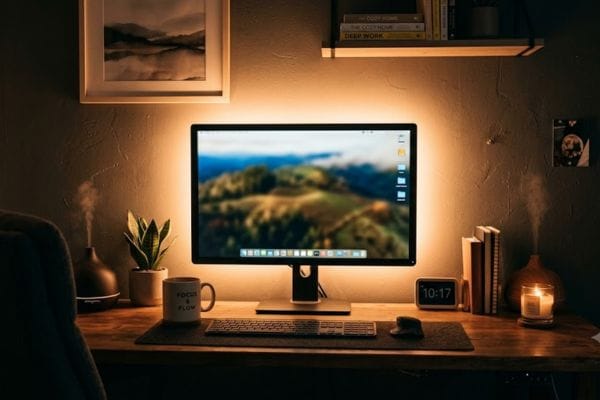
Put Light Behind the Monitor: Stick a cheap, warm LED strip or place a small table lamp directly behind your screen. Lighting up the wall behind the monitor softens the glare and saves your eyes from massive fatigue.
Ditch Aggressive Dark Modes: While dark mode seems great, pure white text on a pitch-black screen causes a weird “bleeding” effect for a lot of people. Try switching to a soft gray, cream, or light sepia background instead. It is much easier on the tracking muscles.
Staring at plain, uninspiring corners won’t give your eyes the complete break they need from the screen. Adding vibrant colors to your workspace peripheral vision can visually anchor your room. If you want an easy upgrade, check out these colorful houseplants that thrive on neglect to clear up your visual workspace without adding extra maintenance to your day.
4. Adjust Your Chair Geometry to Anchor Your Body
If you want the room to stop spinning, you have to give your body solid physical cues that it is safe on the ground. When you slouch, lean sideways, or let your feet dangle in the air, your inner ear feels completely unstable. Setting up your chair properly helps Fix Screen Motion Sickness by giving your nervous system a sense of physical stability.
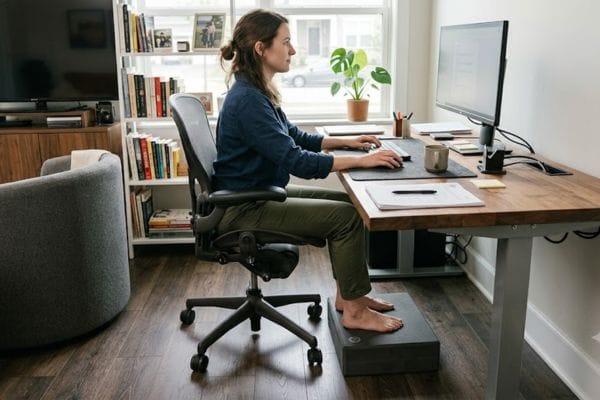
The 90-90-90 Routine: Try to keep your elbows bent at 90 degrees near the desk surface, your hips tucked deep back into the chair at 90 degrees, and your feet flat.
The Footrest Hack: If you had to raise your chair high so your hands can type comfortably, but now your feet don’t firmly plant on the floor, you feel unanchored. Slide a firm pillow, a yoga block, or a stack of thick old magazines under your feet. For a long-term premium upgrade, using an option like the ErgoFoam Adjustable Under Desk Foot Rest gives your lower back that perfect chiropractor-endorsed support while keeping your body completely stable.
5. Slow Down Your Scroll Speed
The ultra-smooth motion of modern high-refresh screens can actually mess with a sensitive nervous system. When pages glide past like liquid, your brain’s spatial awareness gets completely thrown off. Learning to control this visual flow is a massive step if you want to Fix Screen Motion Sickness permanently.
Kill the Animations: Open your computer or phone accessibility settings and turn on “Reduce Motion.” This stops windows from zooming and sliding around every time you click them.
Stop Flick-Scrolling: Avoid making those long, spinning motions with your mouse wheel or trackpad. Instead, use the “Page Down” key or the spacebar to jump down text in distinct, static blocks. It gives your eyes a clean break.

How to Reduce Eye Strain From Computer Screens Naturally
Outside of moving your furniture, a few daily micro-habits keep you from getting dizzy in the first place.
Check the Windows: Never sit facing a bright window directly, and don’t put your back to one either (it causes awful screen reflections). Place your desk perpendicular to windows so light falls evenly from the side.
Clean the Glass: A thin layer of dust or fingerprints forces your eyes to constantly switch focus between the dirt on the glass surface and the actual text behind it. Keep a cloth handy and wipe it daily.
Drink More Water: Your inner ear relies completely on fluid balance to keep your equilibrium steady. Dehydration changes how your brain processes balance, making you way more prone to sudden motion sickness during long shifts.
Simple Gear for Long-Term Desk Comfort
If you tweaked your setup and still feel a little fuzzy after a long day of work, adding a few specific tools can help take the pressure off.
| Product Solution | Primary Benefit | Who It Is For |
| Matte Screen Protectors | Cuts down room glare and reflections completely. | People working in rooms with bright overhead lighting. |
| Basic Monitor Arms | Adjust the height and depth of your screen instantly. | Anyone who likes to shift between sitting and standing. |
| Firm Footrests | Fixes lower back posture by keeping your pelvis aligned. | People with fixed desks whose feet don’t touch the floor. |
| Desk Light Bars | Directs light down onto the desk, never onto the screen glass. | People who finish up projects late at night. |
Listening to Your Body’s Limits
Look, your home office should be a place that actually helps you get things done, not a spot that leaves you feeling sick at the end of the day. Screen motion sickness is just a physical warning sign from your body that your desk setup and your digital habits aren’t matching up.
If you make it a priority to Fix Screen Motion Sickness, you don’t need a total office overhaul. Try lifting your monitor up a bit today, or set up a small lamp behind your screen tonight. These quick, simple changes to your workspace geography will protect your focus, save your energy, and make sure you walk away from your desk clear-headed.
FAQ :
1. What is the 20-8-2 rule in ergonomics?
The 20-8-2 rule is a basic guide for moving your body during a standard 30-minute work window. It breaks down like this:
Sit for 20 minutes using good, supportive posture.
Stand for 8 minutes using a high counter or standing desk to take the pressure off your lower back.
Move for 2 minutes by stretching out, grabbing a glass of water, or walking around the room to keep your blood flowing.
Rotating like this keeps your muscles from tightening up and stops you from feeling sluggish.
2. What is the 90-90-90 rule for ergonomics?
The 90-90-90 rule is the classic checklist for setting up your desk chair. You want to focus on keeping three parts of your body at comfortable 90-degree angles:
Elbows: Resting easily on your armrests or desk surface at a 90-degree angle so your neck stays relaxed.
Hips: Sitting deep back into the chair at 90 degrees with your lower spine supported.
Knees: Bent at a 90-degree angle with your feet resting flat on the ground.
These angles make sure your body weight spreads out evenly instead of straining a single joint.
3. How to relieve back pain from sitting at a desk all day?
If your desk job is killing your lower back, you can find relief fast by trying a few simple changes:
Improvise Lumbar Support: Roll up a small hand towel or use a thin cushion behind the small of your lower back to keep from slouching forward.
Uncross Your Legs: Avoid sitting with one leg over the other. Keep both feet planted flat on the floor or a small footrest to keep your hips level.
Lift Your Screen: Move your monitor up so the top of the glass sits at eye level. This stops you from dropping your chin, which pulls hard on your neck and upper back muscles.
Take Micro-Stretches: Stand up once an hour just to stretch your arms overhead or do a slow fold toward your toes. It loosens up tight hips and lets your spine relax.